

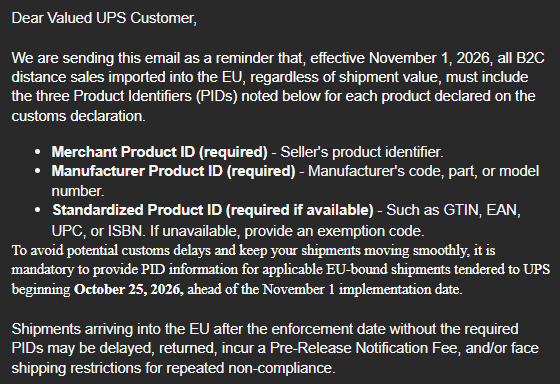
According to the latest UPS notice, there are new requirements that will apply to all B2C (Business-to-Consumer) distance sales imported into the EU beginning November 1, 2026. Although the requirements start in November, UPS requires the Product Identifiers (PIDs) to be in the customs information of EU-bound shipments starting on October 25, 2026 to help prevent issues with shipments that arrive after the implementation date.
According to the UPS email sent in September, shipments arriving in the EU after November 1 without the required information may be delayed, returned, incur a Pre-Release Notification Fee, and/or face shipping restrictions for repeated non-compliance.
These identifiers must be provided for each individual product in the shipment as part of the customs information. See the details on the UPS website and UPS’s additional guidance, but here’s a quick breakdown:
Merchant Product ID (always required)
- This is the seller product identifier: could be the SKU or part number used to sell the product. It’s not global and only holds meaning in the sales system.
Manufacturer Product ID (always required)
- This is the identifier assigned by the manufacturer, not the seller. Think model number, MPN, or factory SKU (not manufacturer lot number).
Standardized Product ID (required if available; exemption code required otherwise)
- This is a globally recognized identifier; common types are UPC, GTIN, EAN-13.
What Does That Mean in DataNinja?
If you ship B2C orders from the U.S. to the EU, you’ll need to make sure these PIDs are available for each product in the shipment when customs information is submitted. One way to maintain this information in DataNinja is by creating Custom Fields on your Parts. This allows the required PID information to be stored with the Part rather than entered repeatedly for individual shipments.
Depending on your shipping process, contact us to have the fields added to an existing customs report or to create a custom report that makes the required shipment information easy to retrieve.
How Do I Create a Custom Field in DataNinja?
Creating a Custom Field in DataNinja is simple. Open the API page (found under All Lists), then go to the Explorer tab and search for ‘Part’. Open the Part section and go to the ‘Custom Field’ tab, then add in each of the necessary Custom Fields. For screenshots and additional instructions, see our DataNinja Guides page on Custom Fields.
Source Note
UPS’s public website currently describes the Product Identifier requirement in connection with B2C shipments valued at €150 or below. However, a more recent UPS International Marketing notice sent directly to customers states that, effective November 1, 2026, all B2C distance sales imported into the EU, regardless of shipment value, must include the required Product Identifiers.
The same notice states that PID information is mandatory for applicable EU-bound shipments tendered to UPS beginning October 25, 2026, and that shipments arriving in the EU without the required PIDs may be delayed, returned, incur a Pre-Release Notification Fee, and/or face shipping restrictions for repeated non-compliance.
Where the September 2026 UPS customer notice differs from the information currently published on UPS’s website, this article reflects the requirements communicated in the customer notice.




Leave a Reply